Annotating
Noter
Noter was a to-do list application for the iPhone, iPad, or iPod Touch. You may open up Noter on your iPhone or sync with your computer.
For researchers who work with text
TAPoR catalogues concordancers, annotators, topic models, stylometry packages, and visualization environments. Every record notes the platform, the license, and what the tool is actually good for.
Filter by the type of analysis.
Annotating
Noter was a to-do list application for the iPhone, iPad, or iPod Touch. You may open up Noter on your iPhone or sync with your computer.
Annotating
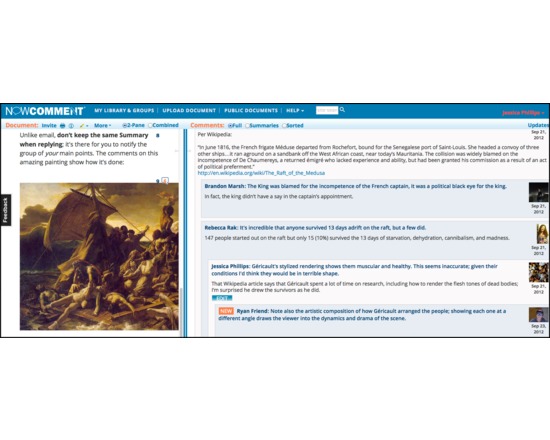
NowComment makes it easy to have rich, engaging discussions of online documents no matter how large (or small) your class or collaboration group. It's fast, powerful, and feature-rich: you can sort comments, skim summaries, create assignments, hide comments, highlight with multiple colors and meanings, and much more. Integrates to any LMS via LTI. Used in universities and K12 schools for the past 6 years.

Annotating
NVivo is a commercial software package for creating workspaces and corpuses. Its features include importing YouTube videos and comments, social media posts and discussions, web page and PDF capture, multiple language support and support for a wide variety of data formats such as spreadsheets, images, database tables and so on. Users can query their data in a variety of ways, annotate, cross-link and visualize connections, ideas and findings with charts, maps and models

Annotating
Microsoft OneNote is a digital notebook that allows you to gather notes and information in a central environment, and search across your shared notebooks to better manage information and work with others. OneNote used to be available as paid software, but is now free across platforms.
Annotating
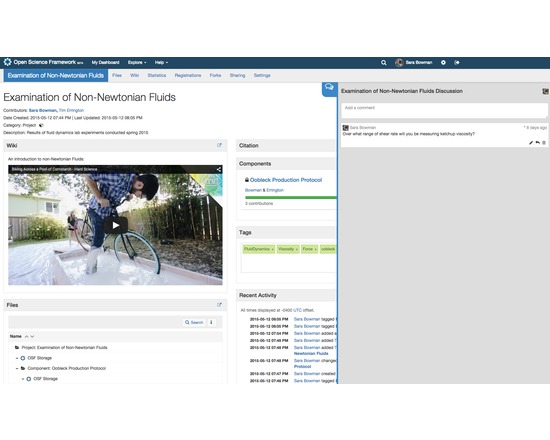
The Open Science Framework (OSF) is a free, open source tool designed to help researchers manage the entire research workflow: planning, execution, reporting, archiving and discovery. It is part collaboration software and part version control system. The OSF can be used to manage individual projects or large collaborative ones. Privacy and sharing settings allow for fine-grained control over access to files and materials stored on the platform - share privately with collaborators or publicly with the community at large. Each project, contributor, and file on the OSF is given a persistent unique identifier, making all research products citable. The platform also mints DOIs and ARKs through DataCite. A collaborative wiki allows contributors to work on writing materials simultaneously. API connections with other services (Github, Dropbox, Box, Dataverse, Google Drive, figshare, Zotero, Mendeley, Amazon S3) allow researchers to connect other services they already use in order to see all their materials in one place. The OSF also offers a registry for preregistering research projects and/or analysis plans.
Annotating
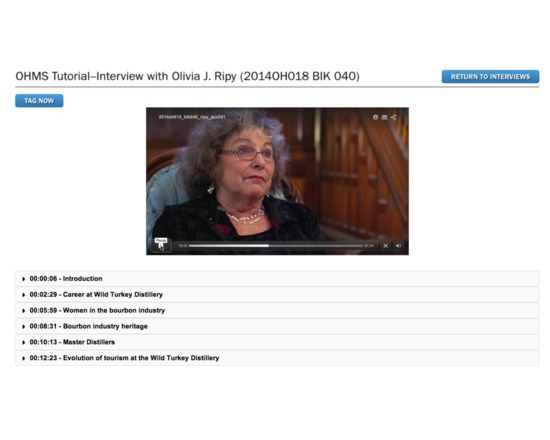
OHMS (Oral History Metadata Synchronizer) inexpensively and efficiently enhances access to oral history by providing users with word-level search capability and a time-correlated transcript or indexed interview connecting the textual search term to the corresponding moment in the recorded interview online. OHMS is an open source, web-based application designed to improve the user experience you provide for oral history, no matter what CMS or repository you use. There are 2 main components of the OHMS system OHMS Application: The OHMS application is where the work is done. This is the back-end, web-based application where interviews are imported, and metadata is created. In the OHMS application transcripts are time-coded and/or interviews are indexed. Upon completion, the interview record (including the synchronized transcript and/or time-coded index) are exported as an XML file. When located on a web server, the OHMS XML file is what interfaces with your content management system through the OHMS Viewer. OHMS Viewer: The OHMS viewer is the user interface of ohms. When an interview is called by the repository, the OHMS viewer loads, calling select interview level metadata and the intra interview level metadata created in the OHMS Application from the corresponding xml file.
Week of 1 Nov – 7 Nov
Three tools from the catalogue, each rated at least 3 stars. A new set appears each Sunday.
Curated list created by experience authors in the fields.

Geoffrey Rockwell
Not all Voyant tools show up in the default view or skin. Here is a list of some of the other tools worth trying.
4 tools
View list
Holly Pickering
Interested in audio production and editing? Here are a few programs that can help you get on your way. Some of them are free, some not, but all are helpful and useful.
3 tools
View list
Jason Bradshaw
This list compiles a suite of tools that make up Kynan Ly's Text Analysis for Twitter Research (TATR) Library. Recipes to these notebooks can be found on methodi.ca
6 tools
View list1321
Tools catalogued
15
Curated lists
22
Analysis types
671
Community reviews
Researchers, power users, and students will soon be able to contribute tools, share reviews, and curate lists around their own work.